Cruising through www.dell.ie the other day checking out the spec. on a PC for a customer I happened to note that Dell are no longer supplying a Windows operating system disk as standard with new PCs. This is, according to their website, because they now include a "recovery solution" pre-installed on their Dimension desktop PC range. As their website says:
PC Restore recovery solution by Symantec® comes pre-installed on your computer's hard drive. If you require CDs to perform advanced tasks choose the CD for the operating system you selected above.
If you want the OS CD you'll have to fork out €6.05 extra for it and the same applies to the Resource CD which contains system drivers and utilities. In theory, if you have a pre-installed "recovery solution" you shouldn't need the OS disk or driver disk. If you need to reinstall the OS just press F10 at boot and follow the on-screen instructions to restore your PC back to factory condition. Great. But what happens if your hard disk goes pear-shaped and takes your pre-installed "recovery solution" to hard disk heaven? Then you'll wish you had purchased the OS disks. This is one of the reasons I feel the customer should always be supplied with the disks. Another reason is that there are extra tools on this disk, such as the Recovery Console and Backup Tool, that are not necessarily installed by default.
Whether Dell will supply you with an OS disk three years down the line when you are faced with a corrupt master boot record remains to be seem. My advice is to tell the Dell salesperson that you'll buy the machine, but only if they will throw in the OS and Resource CDs. I doubt they will risk losing a sale over €12.10. But then again, you never know.
Tuesday, March 07, 2006


Monday, March 06, 2006
On-Line Music
I've always been a great believer in there being no such thing as a free lunch when it comes to using the internet and this is particularly true in relation to music acquired on-line. Yes you can get music for "free" on the internet provided you are happy infringing copyright and running the risk of prosecution if you are found to be in breach of copyright laws. You should also be comfortable with the possibility of picking up more than you bargained for (spyware or viruses) when using a program like Kazaa, Bearshare, Limewire, eDonkey, Gnutella, AudioGalaxy, Grokster, Morpheus or any of the other P2P (peer-to-peer) file sharing programs that are available. Putting aside the copyright infringement aspect of P2P activity for now, peer-to-peer means that there is no central server involved in the transfer of the music file. It is transferred to your machine from the machines of potentially thousands of other individuals who may not all play the game as fairly as you. Is that file called KaiserChiefs.mp3 really the Kaiser Chiefs' latest album or is it possibly a carrier for a virus payload that may do serious damage to your PC.?
You see, when it comes to P2P filesharing the basic problem is that there is no quality control performed on the files that are transferred. Many of the songs downloaded are of poor quality, ripped at too low a bitrate, or are incomplete - starting or stopping abruptly. This is inconvenient, but hardly critical. What is critical, to my mind, is the fact that many P2P programs introduce spyware to your PC (have you ever read the EULA - end user license agreement - before installing a P2P program? Take a closer look next time or check out section 9 of the Kazaa EULA here to see all the "extras" that get installed that you probably know nothing about). Also of concern is the fact that there is no "adult" checking what actually is in all those files going between machines.
So what to do. Well, there are plenty of legal, quality-controlled, server-based commercial providers of on-line music out there and you can find an excellent comparison of the key players here. My favourite for obvious reasons (cost and absence of DRM) is www.allofmp3.com and you can read more about this site and how it manages to tip-toe through the legal copyright minefield at this link.
Whatever commercial site you choose to buy your music from now is the time to ditch the P2P software on your PC and go commercial. If I can't convince you to do it now, perhaps you'll be persuaded when you have to pay €€€ for a system rebuild. You'll learn that "free" is a relative term.
You see, when it comes to P2P filesharing the basic problem is that there is no quality control performed on the files that are transferred. Many of the songs downloaded are of poor quality, ripped at too low a bitrate, or are incomplete - starting or stopping abruptly. This is inconvenient, but hardly critical. What is critical, to my mind, is the fact that many P2P programs introduce spyware to your PC (have you ever read the EULA - end user license agreement - before installing a P2P program? Take a closer look next time or check out section 9 of the Kazaa EULA here to see all the "extras" that get installed that you probably know nothing about). Also of concern is the fact that there is no "adult" checking what actually is in all those files going between machines.
So what to do. Well, there are plenty of legal, quality-controlled, server-based commercial providers of on-line music out there and you can find an excellent comparison of the key players here. My favourite for obvious reasons (cost and absence of DRM) is www.allofmp3.com and you
 can read more about this site and how it manages to tip-toe through the legal copyright minefield at this link.
Whatever commercial site you choose to buy your music from now is the time to ditch the P2P software on your PC and go commercial. If I can't convince you to do it now, perhaps you'll be persuaded when you have to pay €€€ for a system rebuild. You'll learn that "free" is a relative term.
Saturday, March 04, 2006
Google Earth
If you haven't tried Google Earth yet then shame on you. It doesn't really matter if you have no practical use for the program, it's just fun zooming in on places of interest from a great height, or checking out if you can see your own back garden.
Google Earth is a 11.2 MB download - go to the Google home page and click on more >> or just click here. Once you download the installation program click on the file to start the installation and follow the instructions. Once installed it will place a Google Earth icon on your desktop from where you can launch the application.
The program is based on satellite imagery and was devised by tech startup Keyhole, which was purchased by Google after their IPO. What the program allows you to do is zoom seamlessly from a whole-earth view right down to street level where people, allbeit as small dots, can be seen. While all the world is mapped, not all of it is mapped to the same resolution. For example, for Dublin, south of the Sugar Loaf and west of the M50 are not shown in great detail. However,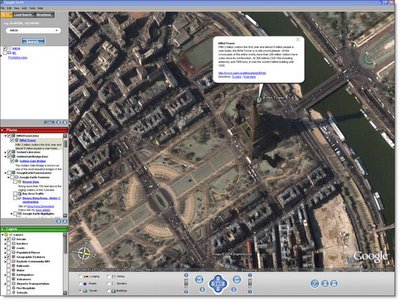 Google are updating their maps continually and our own house was low resolution up until 3 months ago - now I can tell that there was no one on our chimney the day the picture was taken!
As a piece of software, Google Earth is more interesting than useful. It's a bit like browsing through an encyclopedia - you keep going to new subjects just because you're curious to find out about them rather than having a pressing need for the information. But who ever said great software has to be useful. Try it - I guarantee you'll enjoy the experience of being a voyeur from 12,000 feet.
Google Earth is a 11.2 MB download - go to the Google home page and click on more >> or just click here. Once you download the installation program click on the file to start the installation and follow the instructions. Once installed it will place a Google Earth icon on your desktop from where you can launch the application.
The program is based on satellite imagery and was devised by tech startup Keyhole, which was purchased by Google after their IPO. What the program allows you to do is zoom seamlessly from a whole-earth view right down to street level where people, allbeit as small dots, can be seen. While all the world is mapped, not all of it is mapped to the same resolution. For example, for Dublin, south of the Sugar Loaf and west of the M50 are not shown in great detail. However,
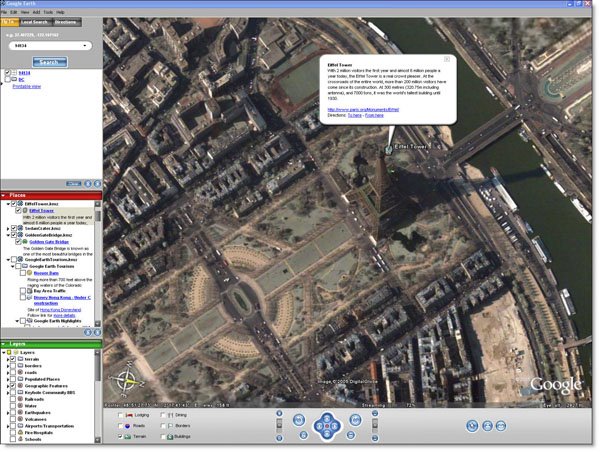 Google are updating their maps continually and our own house was low resolution up until 3 months ago - now I can tell that there was no one on our chimney the day the picture was taken!
As a piece of software, Google Earth is more interesting than useful. It's a bit like browsing through an encyclopedia - you keep going to new subjects just because you're curious to find out about them rather than having a pressing need for the information. But who ever said great software has to be useful. Try it - I guarantee you'll enjoy the experience of being a voyeur from 12,000 feet.

Costly Recovery
If you have a physically damaged hard drive, as could happen if you drop a laptop, and need to recover the data from it be prepared for a large bill at the end of the process. Data retrieval from physically damaged hard drives requires a certified clean room environment so that the drive can be disassembled and the platters removed and mounted in specialised retrieval rigs. As this equipment doesn't come cheap the charges for data recovery are high.
For example, Easy Recovery of Belfast (www.easyrecovery.co.uk) normally charge a flat fee of £499 or €728 to recover the contents of a hard drive. This is a competitive price and is typical of what you can expect to pay. As you can see, it can cost you as much as a new machine to recover your data when a hard drive physically fails. Just one more reason to get into the habit of backing up those irreplaceable photographs, that draft thesis, or important financial documents. Just do it!
For example, Easy Recovery of Belfast (www.easyrecovery.co.uk) normally charge a flat fee of £499 or €728 to recover the contents of a hard drive. This is a competitive price and is typical of what you can expect to pay. As you can see, it can cost you as much as a new machine to recover your data when a hard drive physically fails. Just one more reason to get into the habit of backing up those irreplaceable photographs, that draft thesis, or important financial documents. Just do it!
Friday, March 03, 2006

Incorporation
PC Medic has moved from sole trader status to private limited company and we are now trading as PC Medic Limited. In all other respects, it's business as usual.

Thursday, March 02, 2006
TV Listings
If you want to know what's coming up on the TV over the coming weeks you have a couple of traditional options. You can buy the RTE Guide, TV Times or some other weekly publication for a few euro a copy or you can use the Teletext on your TV.
Alternatively you can find listings on the web. For example RTE do a listing for today and tomorrow in conjunction with the RTE Guide which you can find here. This is fine for your short term planning but not much good for planning next week's viewing.
What we use in the PC Medic household is a web-based subscription service called DigiGuide. This UK-based company does a listing specifically for NTL Ireland subscribers for the princely sum of £8.99 per year. DigiGuide allows you to view channel listings up to 14 days in advance and to view that information in a number of different and meaningful ways (the Grid view is shown in the picture). You can click on any program and set a viewing reminder whereupon 5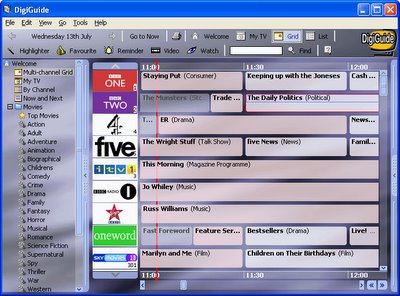 minutes before the scheduled broadcast time DigiGuide will give you a spoken reminder of the name of the program, the channel it is on and that it will start in 5 minutes time. Makes missing programs difficult. DigiGuide can be taken one step further if you have a Hauppauge TV card fitted to your PC which, of course, the PC Medic household has. With the help of a small freeware plug-in called PVRrecord, you can right-click on any scheduled program in DigiGuide and choose to record the programme once, or every time it appears in the schedule. This, in effect, gives you similar control of your program recording as a Sky Plus box, albeit in a less elegant way. Having used DigiGuide for nearly two years now, it's hard to see how we managed without it.
Alternatively you can find listings on the web. For example RTE do a listing for today and tomorrow in conjunction with the RTE Guide which you can find here. This is fine for your short term planning but not much good for planning next week's viewing.
What we use in the PC Medic household is a web-based subscription service called DigiGuide. This UK-based company does a listing specifically for NTL Ireland subscribers for the princely sum of £8.99 per year. DigiGuide allows you to view channel listings up to 14 days in advance and to view that information in a number of different and meaningful ways (the Grid view is shown in the picture). You can click on any program and set a viewing reminder whereupon 5
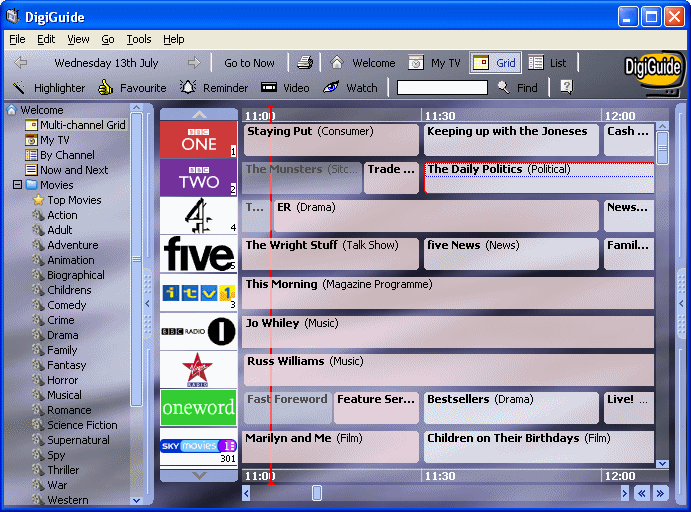 minutes before the scheduled broadcast time DigiGuide will give you a spoken reminder of the name of the program, the channel it is on and that it will start in 5 minutes time. Makes missing programs difficult. DigiGuide can be taken one step further if you have a Hauppauge TV card fitted to your PC which, of course, the PC Medic household has. With the help of a small freeware plug-in called PVRrecord, you can right-click on any scheduled program in DigiGuide and choose to record the programme once, or every time it appears in the schedule. This, in effect, gives you similar control of your program recording as a Sky Plus box, albeit in a less elegant way. Having used DigiGuide for nearly two years now, it's hard to see how we managed without it.
Wednesday, March 01, 2006
Bath Time!
 OK, so it might seem like a joke (still a month until April1st) but Unotron are offering washable and surface sterilisable mice and keyboards. Not as wacky as it might first sound. Have a close look at the keyboard and mouse you're currently using - my guess is they may be pretty tacky as they seem to be magnets for grime and crumbs of digestive biscuits and Tayto. Now think about the mice and keyboards that need to be used in hospitals, pharmaceutical clean rooms and food manufacturing companies and these guys may be on to something with their SpillSeal range.
Desktop vs. Laptop
As the price of both desktops and laptops fall, more and more people are considering laptops as their next computer purchase in place of a desktop machine. I can see a number of reasons for this trend:
1. Narrowing of performance gap. In times gone by, laptops generally had much inferior performance to desktop machines. They usually came with much slower processors, smaller and slower hard drives, minimal memory and small screens which ran your applications much slower than an equivalently priced desktop machine. While desktops still have the upper hand in absolute processing power terms, most modern laptops are more than powerful enough to run the typical applications that a home user needs e.g. word processor, web browser, e-mail, CD and DVD playback etc. and the size and quality of the screens can now rival desktop machines.
2. Drop in price. While still more expensive than an equivalent (in terms of processor/memory/hard drive) desktop, the price of laptops has dropped significantly over the years and one can purchase an "entry" level unit, allbeit with a low spec, for under €500.
3. Space-saving size. With the advent of the shoebox apartment, and marginally bigger townhouses, desktop PCs, particularly those with legacy CRT monitors, are seen as too big for such environments. Laptops, which can be brought out when needed and put away in a press when finished with appear attractive when space is at a premium.
4. Portability. Some people have a genuine need to be able to use their PC in different locations e.g. home and work, at a friends house, or while relaxing in the garden. With the advent of wireless networking, it is appealing to be able to browse the web from the downstairs sofa, the garden lounger or even while in bed.
Notwithstanding the above, there are a couple of points to consider before rushing out and buying a new laptop.
1. Breakdown rates are higher. As I mentioned in an earlier blog, modern desktop computers are incredibly reliable, especially when you consider their level of complexity. Unfortunately laptops do not share this level of reliability. There are a number of reasons for this. Firstly, laptops, by their very nature are moved around more often. They are, therefore, more prone to accidental knocks and drops - a great way to cause irreparable damage to the hard drive or leave the screen only good for replacing. Secondly, the high density packing of components in a typical laptop case leads to high internal temperatures as heat dissipation is not as efficient as in most desktop cases. This leads to a greater degree of thermal cycling in the components which results in stress on component/motherboard interfaces. Too much stress and a dry joint (electrical isolation) can result. Finally, certain components are prone to physical failure. For example, one of the commonest problems I've seen with laptops is a damaged power socket at the rear of the unit. This arises from rough or repeated insertion/removal of the power plug and can result in the socket becoming detached from the motherboard it is normally soldered to - certainly a non-trivial repair scenario.
2. Repair costs are higher. By and large, all components that go into a desktop PC comply with industry standards for design and interoperability. That is to say that a power supply unit from one desktop will fit any other desktop - the same goes for sound cards, graphics cards, dvd-writers, etc. Unfortunately this is not necessarily the case for laptops, with individual manufacturers coming up with bespoke designs. In addition to raising the cost for replacement parts, it essentially means that the dissassembly and reassembly of laptops from different manufacturers is completely different and, consequently, more time consuming. Also leading to higher labour costs when repairs are necessary is the greater complexity involved in working on laptops due to minuaturisation and restricted access. Packing so many components into a small space means that to get at the defective power socket mentioned earlier requires, in many cases, removal of practically all components and plastics attached to the motherboard just to get a soldering iron in place. And time, as they say, is money.
3. Upgradability/Expandability is lower. Your average desktop is modular in design and many aspects can be upgraded and expanded, in many cases by the end user. For example upgrading memory, sound cards, graphics cards, hard drives or adding new features such as firewire, wireless networking or tv tuners are all relatively simple procedures that can be applied to practically all desktop computers. On the other hand many laptops have little or no upgradability or expandability. For this reason, buying a cheap laptop with a view to beefing it up when you need better performance or new features is not a wise option. If you need a full feature set in a laptop, buy it with those features on day one, but be prepared to pay extra for them.
Don't get me wrong, I'm a big fan of laptops and use one everyday in the course of business. But I think that they have become somewhat of a fashion item and it has become almost trendy to have one instead of, or in addition to, a desktop PC (mobile phones in the 80's, anyone). Before you buy one make sure that you really do need the two main advantages that a laptop offers over a desktop (portability and compactness) and be aware of the potential downside.
1. Narrowing of performance gap. In times gone by, laptops generally had much inferior performance to desktop machines. They usually came with much slower processors, smaller and slower hard drives, minimal memory and small screens which ran your applications much slower than an equivalently priced desktop machine. While desktops still have the upper hand in absolute processing power terms, most modern laptops are more than powerful enough to run the typical applications that a home user needs e.g. word processor, web browser, e-mail, CD and DVD playback etc. and the size and quality of the screens can now rival desktop machines.
2. Drop in price. While still more expensive than an equivalent (in terms of processor/memory/hard drive) desktop, the price of laptops has dropped significantly over the years and one can purchase an "entry" level unit, allbeit with a low spec, for under €500.
3. Space-saving size. With the advent of the shoebox apartment, and marginally bigger townhouses, desktop PCs, particularly those with legacy CRT monitors, are seen as too big for such environments. Laptops, which can be brought out when needed and put away in a press when finished with appear attractive when space is at a premium.
4. Portability. Some people have a genuine need to be able to use their PC in different locations e.g. home and work, at a friends house, or while relaxing in the garden. With the advent of wireless networking, it is appealing to be able to browse the web from the downstairs sofa, the garden lounger or even while in bed.
Notwithstanding the above, there are a couple of points to consider before rushing out and buying a new laptop.
1. Breakdown rates are higher. As I mentioned in an earlier blog, modern desktop computers are incredibly reliable, especially when you consider their level of complexity. Unfortunately laptops do not share this level of reliability. There are a number of reasons for this. Firstly, laptops, by their very nature are moved around more often. They are, therefore, more prone to accidental knocks and drops - a great way to cause irreparable damage to the hard drive or leave the screen only good for replacing. Secondly, the high density packing of components in a typical laptop case leads to high internal temperatures as heat dissipation is not as efficient as in most desktop cases. This leads to a greater degree of thermal cycling in the components which results in stress on component/motherboard interfaces. Too much stress and a dry joint (electrical isolation) can result. Finally, certain components are prone to physical
 failure. For example, one of the commonest problems I've seen with laptops is a damaged power socket at the rear of the unit. This arises from rough or repeated insertion/removal of the power plug and can result in the socket becoming detached from the motherboard it is normally soldered to - certainly a non-trivial repair scenario.
2. Repair costs are higher. By and large, all components that go into a desktop PC comply with industry standards for design and interoperability. That is to say that a power supply unit from one desktop will fit any other desktop - the same goes for sound cards, graphics cards, dvd-writers, etc. Unfortunately this is not necessarily the case for laptops, with individual manufacturers coming up with bespoke designs. In addition to raising the cost for replacement parts, it essentially means that the dissassembly and reassembly of laptops from different manufacturers is completely different and, consequently, more time consuming. Also leading to higher labour costs when repairs are necessary is the greater complexity involved in working on laptops due to minuaturisation and restricted access. Packing so many components into a small space means that to get at the defective power socket mentioned earlier requires, in many cases, removal of practically all components and plastics attached to the motherboard just to get a soldering iron in place. And time, as they say, is money.
3. Upgradability/Expandability is lower. Your average desktop is modular in design and many aspects can be upgraded and expanded, in many cases by the end user. For example upgrading memory, sound cards, graphics cards, hard drives or adding new features such as firewire, wireless networking or tv tuners are all relatively simple procedures that can be applied to practically all desktop computers. On the other hand many laptops have little or no upgradability or expandability. For this reason, buying a cheap laptop with a view to beefing it up when you need better performance or new features is not a wise option. If you need a full feature set in a laptop, buy it with those features on day one, but be prepared to pay extra for them.
Don't get me wrong, I'm a big fan of laptops and use one everyday in the course of business. But I think that they have become somewhat of a fashion item and it has become almost trendy to have one instead of, or in addition to, a desktop PC (mobile phones in the 80's, anyone). Before you buy one make sure that you really do need the two main advantages that a laptop offers over a desktop (portability and compactness) and be aware of the potential downside.
Tuesday, February 28, 2006
Securing Wireless Networks
A question I get asked quite a lot is "How secure are wireless networks?" and my stock answer is "As secure as you make them". For a domestic wireless network there are just two steps that you need to take to provide you with adequate security.
1. Enable encryption. There are two basic types of encryption - WEP (Wired Equivalent Privacy) and WPA (Wi-Fi Protected Access). All wireless routers that you are likely to encounter will allow you to enable WEP. WEP can be set to afford either 64-bit or 128-bit encryption which involves entering either a 10 or 24 digit hex (base 16) number. Eircom routers (Netopia boxes) now use 128-bit encryption by default, so you will need to get the 24-digit number from the router and enter it when your PC/Laptop connects with the router. More recent routers allow the more secure WPA encryption to be deployed. There has been much written about how insecure WEP encryption is compared to WPA. Let's be clear that any encryption in a domestic wireless network is going to keep all but the most dedicated hacker out of your system. To hack into a wireless network, in a meaningful way, is not a trivial matter. First, the hacker needs to be within range of your wireless transmissions, which means that, unless it is your immediate next door neighbour that is trying to hack you, he/she will need to be camped outside your house for prolonged periods of time. Next he/she needs to be familiar with wireless hacking tools, almost all of which are Linux-based and quite cryptic to use - not something that the average 10-year old kid will be familiar with. There are "specialists" out there who can be hired to break into the wireless networks of big corporations for financial gain but, believe me, they are not particularly interested in your late night browsing habits.
2. Filter MAC addresses. All network devices (network cards, routers, access points, etc) have an individual MAC (Media Access Control) address which is a hardware address that uniquely identifies each node of a network. The MAC address consists of 6 pairs of hex numbers, such as 00-0E-23-A5-31-4C, and each is unique to a particular device. Almost all routers today allow MAC filtering to be set up for a network. This is done by entering the MAC addresses of the network cards in the PCs/laptops that you want to allow to connect to the network. Once set up only these PCs will be allowed to connect and a PC with a different MAC address will be refused admission. To check your IP address go to Start>Run, type cmd and click OK. This will open the Command Prompt window. At the flashing cursor type ipconfig /all and hit return. Your MAC address is the 12-digit hex number listed under Physical Address.
These two simple steps will provide your wireless network with all the security that you are likely to need.
1. Enable encryption. There are two basic types of encryption - WEP (Wired Equivalent Privacy) and WPA (Wi-Fi Protected Access). All wireless routers that you are likely to encounter will allow you to enable WEP. WEP can be set to afford either 64-bit or 128-bit encryption which involves entering either a 10 or 24 digit hex (base 16) number. Eircom routers (Netopia boxes) now use 128-bit encryption by default, so you will need to get the 24-digit number from the router and enter it when your PC/Laptop connects with the router. More recent routers allow the more secure WPA encryption to be deployed. There has been much written about how insecure WEP encryption is compared to WPA. Let's be clear that any encryption in a domestic wireless network is going to keep all but the most dedicated hacker out of your system. To hack into a wireless network, in a meaningful way, is not a trivial matter. First, the hacker needs to be within range of your wireless transmissions, which means that, unless it is your immediate next door neighbour that is trying to hack you, he/she will need to be camped outside your house for prolonged periods of time. Next he/she needs to be familiar with wireless hacking tools, almost all of which are Linux-based and quite cryptic to use - not something that the average 10-year old kid will be familiar with. There are "specialists" out there who can be hired to break into the wireless networks of big corporations for financial gain but, believe me, they are not particularly interested in your late night browsing habits.
2. Filter MAC addresses. All network devices (network cards, routers, access points, etc) have an individual MAC (Media Access Control) address which is a hardware address that uniquely identifies each node of a network. The MAC address consists of 6 pairs of hex numbers, such as 00-0E-23-A5-31-4C, and each is unique to a particular device. Almost all routers today allow MAC filtering to be set up for a network. This is done by entering the MAC addresses of the network cards in the PCs/laptops that you want to allow to connect to the network. Once set up only these PCs will be allowed to connect and a PC with a different MAC address will be refused admission. To check your IP address go to Start>Run, type cmd and click OK. This will open the Command Prompt window. At the flashing cursor type ipconfig /all and hit return. Your MAC address is the 12-digit hex number listed under Physical Address.
These two simple steps will provide your wireless network with all the security that you are likely to need.
Sunday, February 26, 2006
More on Malware
Earlier this week we had a Compaq PC in for treatment. Basically there were a lot of things wrong with the box, most of them pointing to viral infection. The box came with McAfee Antivirus, a 90-day trial version, pre-installed by Compaq. Looking a little closer showed that the program had never performed a full system scan and the virus definitions had never been updated. Little wonder then that we found 165 infected files - it was like a who's who of the top twenty viruses out there - Netsky, Bugbear, Sober, Beagle, etc., all present and correct.
 So this machine had effectively been crippled by viruses and the owner had taken no precautions to prevent this happening. Sadly this is something that we see time and time again - either through lack of knowledge or through inertia, PCs are left effectively unprotected against viral threats. When it comes to spyware the situation is even worse as the majority of home users continue to be largely unaware of its existence and how to combat it ("Yeah, I installed Adaware so I'm sorted for spyware"!!!).
I read recently that there are now nearly 2000 new malware threats per month, up from around 1000 per month in 2004. If you use a computer and that computer connects to the internet then you must understand what malware is and how to prevent it, otherwise expect to bring it to your friendly pc maintenance shop in the coming months for a rebuild. Learn more about viruses and spyware here. You have been warned ... again.
 So this machine had effectively been crippled by viruses and the owner had taken no precautions to prevent this happening. Sadly this is something that we see time and time again - either through lack of knowledge or through inertia, PCs are left effectively unprotected against viral threats. When it comes to spyware the situation is even worse as the majority of home users continue to be largely unaware of its existence and how to combat it ("Yeah, I installed Adaware so I'm sorted for spyware"!!!).
I read recently that there are now nearly 2000 new malware threats per month, up from around 1000 per month in 2004. If you use a computer and that computer connects to the internet then you must understand what malware is and how to prevent it, otherwise expect to bring it to your friendly pc maintenance shop in the coming months for a rebuild. Learn more about viruses and spyware here. You have been warned ... again.
Saturday, February 25, 2006
The Cutting Edge!
A customer called me recently to see if I could help him install the latest version of McAfee Internet Security (he previously had version 6 and had just purchased version 8). I asked him if he had tried the Add/Remove program in the control panel to remove version 6 before installing the new version and he replied that that's when he ran into problems. He said he contacted McAfee's technical support, whereupon he got the low down (from Brad) in an e-mail as to how "exactly" the process should go. I was so amazed at the level of complexity that McAfee expects their ordinary home users to understand and the steps that they must take to install a program that I felt I should share it with you. What I want to know is why the McAfee uninstaller that came with version 6 did not attend to all of the items listed in the e-mail that now follows. Read on, this is good!
Dear ******
please uninstall McAfee Internet Security 6 as per the steps below and then install McAfee Internet Security 8.
Uninstall Internet Security 6 from add/remove program in control panel and reboot the computer.
Delete the following folders:
i) C:\Program Files\McAfee
ii) C:\Program Files\McAfee.com
iii) C:\Document & Settings\All Users\Application Data\McAfee
iv) C:\Document & Settings\All Users\Application Data\McAfee.com
PC Medic Note: The Application Data folder mentioned above is a hidden folder - how many home users know that and how many know how to access hidden folders? Not too many is my guess.
Note : iii & iv steps to be followed in case you have Windows 2000/XP
Temp:
http://ts.mcafeehelp.com/faq3.asp?docid=70973
http://ts.mcafeehelp.com/faq3.asp?docid=68085
Start > Run > Regedit
Click OK
Make a backup ----> http://ts.mcafeehelp.com/faq3.asp?docid=68037
Delete following entries:
HKEY_CLASSES_ROOT\Installer\Features\
187DD389AD0152C47860E951D2CFFE09
HKEY_CLASSES_ROOT\Installer\Products\
187DD389AD0152C47860E951D2CFFE09
HKEY_LOCAL_MACHINE\SOFTWARE\Microsoft\
Windows\CurrentVersion\Run\MskDetector.Exe
HKEY_LOCAL_MACHINE\SOFTWARE\Microsoft\
Windows\CurrentVersion\Run\MISAggregator.Exe
HKEY_CURRENT_USER\Software\McAfee
HKEY_CURRENT_USER\Software\McAfee.com
HKEY_CURRENT_USER\Software\Microsoft\Windows\
CurrentVersion\Explorer\MenuOrder\StartMenu\Programs\McAfee
HKEY_LOCAL_MACHINE\SOFTWARE\McAfee
HKEY_LOCAL_MACHINE\SOFTWARE\McAfee.com
HKEY_LOCAL_MACHINE\SOFTWARE\Network Associates
Close Registry Editor
Reboot
I hope that I've answered your questions effectively. If not, feel free to contact support again. Please include all previous correspondence when replying.
Regards,
Brad
Technical Support Agent
McAfee Online Technical Support
Thanks for that, Brad. It leaves us with a warm fuzzy feeling that we're dealing with real cutting edge software!
Dear ******
please uninstall McAfee Internet Security 6 as per the steps below and then install McAfee Internet Security 8.
Uninstall Internet Security 6 from add/remove program in control panel and reboot the computer.
Delete the following folders:
i) C:\Program Files\McAfee
ii) C:\Program Files\McAfee.com
iii) C:\Document & Settings\All Users\Application Data\McAfee
iv) C:\Document & Settings\All Users\Application Data\McAfee.com
PC Medic Note: The Application Data folder mentioned above is a hidden folder - how many home users know that and how many know how to access hidden folders? Not too many is my guess.
Note : iii & iv steps to be followed in case you have Windows 2000/XP
Temp:
http://ts.mcafeehelp.com/faq3.asp?docid=70973
http://ts.mcafeehelp.com/faq3.asp?docid=68085
Start > Run > Regedit
Click OK
Make a backup ----> http://ts.mcafeehelp.com/faq3.asp?docid=68037
Delete following entries:
HKEY_CLASSES_ROOT\Installer\Features\
187DD389AD0152C47860E951D2CFFE09
HKEY_CLASSES_ROOT\Installer\Products\
187DD389AD0152C47860E951D2CFFE09
HKEY_LOCAL_MACHINE\SOFTWARE\Microsoft\
Windows\CurrentVersion\Run\MskDetector.Exe
HKEY_LOCAL_MACHINE\SOFTWARE\Microsoft\
Windows\CurrentVersion\Run\MISAggregator.Exe
HKEY_CURRENT_USER\Software\McAfee
HKEY_CURRENT_USER\Software\McAfee.com
HKEY_CURRENT_USER\Software\Microsoft\Windows\
CurrentVersion\Explorer\MenuOrder\StartMenu\Programs\McAfee
HKEY_LOCAL_MACHINE\SOFTWARE\McAfee
HKEY_LOCAL_MACHINE\SOFTWARE\McAfee.com
HKEY_LOCAL_MACHINE\SOFTWARE\Network Associates
Close Registry Editor
Reboot
I hope that I've answered your questions effectively. If not, feel free to contact support again. Please include all previous correspondence when replying.
Regards,
Brad
Technical Support Agent
McAfee Online Technical Support
Thanks for that, Brad. It leaves us with a warm fuzzy feeling that we're dealing with real cutting edge software!
Tuesday, February 21, 2006
Video Transfer: USB vs Firewire
A customer arrived in today with a problem transferring video from his DV camera to his PC without stuttering. The camera in question was a Samsung VP-D453, which seems a nice little unit, and he was using a USB cable to transfer the video to the PC. My experience with video transfer to date has been with Firewire (IEEE 1394) and I wasn't sure what to expect when using a USB cable so I dug around the web see how USB measured up to the task and garnered the following:
"In the not too distant past, there was a clear distinction between USB and FireWire. USB 1.1 could not transfer high quality DV; loosely defined as 25 frames per second (fps) with each frame being 640x480 resolution, due to USB's transfer limit of around 11Mbps (or around 1.5MB per second). Transferring DV requires a transfer rate of at least 3.6MB per second, which left FireWire as the only option due to its ability to work at 400Mbps, or up to around 50MB per second. Then along came USB 2.0 with a transfer rate of 480Mbps or around 60MB per second.
At first glance it would appear that USB 2.0 is even faster than FireWire; however speed is not the only issue when it comes to DV. One serious issue with USB 2.0 is that it can not guarantee a specified data transfer rate. This is due to USB 2.0 being a master-slave technology, which means it needs a computer's CPU to coordinate the appropriate data transfers. While not a problem when dealing with low demand peripherals such as Web cams, scanners, printers etc, digital video requires dependable performance to avoid dropping video frames.
FireWire is a much more independent technology in that it works in a peer-to-peer relationship. For this reason, many professional DV users are now able to download their video from a DV camcorder to an external hard drive without the use of a PC. Finally, and most importantly, FireWire delivers data consistently at a specific rate. If you want to work with video, even to edit the family movie, go with FireWire."
My experience with the customer's camera seemed to bear this out when we did some trials using one of our workshop machines. Firewire, in addition to allowing the camera transport mechanism to be controlled from the PC, gave the best quality picture with no stuttering in evidence.
"In the not too distant past, there was a clear distinction between USB and FireWire. USB 1.1 could not transfer high quality DV; loosely defined as 25 frames per second (fps) with each frame being 640x480 resolution, due to USB's transfer limit of around 11Mbps (or around 1.5MB per second). Transferring DV requires a transfer rate of at least 3.6MB per second, which left FireWire as the only option due to its ability to work at 400Mbps, or up to around 50MB per second. Then along came USB 2.0 with a transfer rate of 480Mbps or around 60MB per second.
At first glance it would appear that USB 2.0 is even faster than FireWire; however speed is not the only issue when it comes to DV. One serious issue with USB 2.0 is that it can not guarantee a specified data transfer rate. This is due to USB 2.0 being a master-slave technology, which means it needs a computer's CPU to coordinate the appropriate data transfers. While not a problem when dealing with low demand peripherals such as Web cams, scanners, printers etc, digital video requires dependable performance to avoid dropping video frames.
FireWire is a much more independent technology in that it works in a peer-to-peer relationship. For this reason, many professional DV users are now able to download their video from a DV camcorder to an external hard drive without the use of a PC. Finally, and most importantly, FireWire delivers data consistently at a specific rate. If you want to work with video, even to edit the family movie, go with FireWire."
My experience with the customer's camera seemed to bear this out when we did some trials using one of our workshop machines. Firewire, in addition to allowing the camera transport mechanism to be controlled from the PC, gave the best quality picture with no stuttering in evidence.
Friday, February 17, 2006
Holiday Reading
Just got back from the holidays this afternoon after 20 hours of travel, so I'm a bit pooped and will keep this brief. This holiday I brought three non-technical books with me as reading material and I thought that you might like my thoughts on them.
 First up was Nick Mason's Inside Out which tells the story of Pink Floyd from the perspective of Pink Floyd's drummer. I've been a fan of the Floyd since Dark Side of the Moon was released (and have all their work since then) but never really got to know the band's background. Mason's book is a well-written documentary of the band from its pre-Pink Floyd origins, when Syd Barrett was the creative force, right through to their reformation for last year's Live8 concert. It's basically a light read with a lot of Mason's dry wit making it quite funny in places. However, strictly one for the Pink Floyd fans. By the way, in the course of reading the book I discovered that the name Pink Floyd was a combination of the first names of two blues singers -Pink Anderson and Floyd Council - worth reading for that fact alone!
 The second book I read was The Road to McCarthy, which is Pete McCarthy's follow-up to his best seller McCarthy's Bar. I would heartily recommend the latter, which is a travelogue around Ireland loosely based on the premise that you should never pass up the opportunity of having a drink in a bar that shares your name. McCarthy writes with the same pithy humour as Bill Bryson and will have you in stitches despite your best efforts to keep a straight face. Unfortunately I found the Road to McCarthy to be a lot less consistent, somewhat more contrived and more of a pastiche of travel writings than his earlier best seller. Nonetheless, a good holiday read with McCarthy's wit in abundance.
 Finally there was Bob Dylan's recently published Chronicles, Volume 1. This one was a bit of a surprise. I guess I was expecting a conventional autobiography with a beginning middle and end, but found something very different. Chronicles, Volume 1 is the first of three planned volumes written by Dylan to document his life and his work and doesn't follow conventional timelines. It is, however, written in a way that reflects the poet in the man - both sophisticated and simple at the same time. Having read Volume 1 you won't know exactly what makes Bob Dylan tick but you will have some glimpses into the man, what inspired him to write some of the songs he did, and how, for him, it's all about the music. You'll also learn how Bobby Zimmerman nearly became Robert Allyn and why he became Bob Dylan. A gem of a book that should leave you looking forward to the next two volumes.
 First up was Nick Mason's Inside Out which tells the story of Pink Floyd from the perspective of Pink Floyd's drummer. I've been a fan of the Floyd since Dark Side of the Moon was released (and have all their work since then) but never really got to know the band's background. Mason's book is a well-written documentary of the band from its pre-Pink Floyd origins, when Syd Barrett was the creative force, right through to their reformation for last year's Live8 concert. It's basically a light read with a lot of Mason's dry wit making it quite funny in places. However, strictly one for the Pink Floyd fans. By the way, in the course of reading the book I discovered that the name Pink Floyd was a combination of the first names of two blues singers -Pink Anderson and Floyd Council - worth reading for that fact alone!
 The second book I read was The Road to McCarthy, which is Pete McCarthy's follow-up to his best seller McCarthy's Bar. I would heartily recommend the latter, which is a travelogue around Ireland loosely based on the premise that you should never pass up the opportunity of having a drink in a bar that shares your name. McCarthy writes with the same pithy humour as Bill Bryson and will have you in stitches despite your best efforts to keep a straight face. Unfortunately I found the Road to McCarthy to be a lot less consistent, somewhat more contrived and more of a pastiche of travel writings than his earlier best seller. Nonetheless, a good holiday read with McCarthy's wit in abundance.
 Finally there was Bob Dylan's recently published Chronicles, Volume 1. This one was a bit of a surprise. I guess I was expecting a conventional autobiography with a beginning middle and end, but found something very different. Chronicles, Volume 1 is the first of three planned volumes written by Dylan to document his life and his work and doesn't follow conventional timelines. It is, however, written in a way that reflects the poet in the man - both sophisticated and simple at the same time. Having read Volume 1 you won't know exactly what makes Bob Dylan tick but you will have some glimpses into the man, what inspired him to write some of the songs he did, and how, for him, it's all about the music. You'll also learn how Bobby Zimmerman nearly became Robert Allyn and why he became Bob Dylan. A gem of a book that should leave you looking forward to the next two volumes.
Sunday, February 12, 2006
Something Fishy
So they now have wireless internet access on Baros, or do they? Well the answer is some of the people do, some of the time, and always at a price. While I'm not overly happy with having to pay $25.00 per day for the privilege of any internet access, I do get annoyed when the service is flaky. Furthermore, I've tested the download speed and the best I've managed to get is 58Kbs, a far cry from what one would consider broadband.
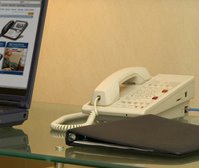 The fun started after we got an access code from reception, which we presumed you would enter into a default login page that would open as soon as you opened your browser. My laptop could see the Baros Wireless network as soon as I powered up but could not acquire an IP address. I tried a few things to remedy this but either their DHCP server was down or the access point in the room was flaky. I tried rebooting the access point, which is supplied by Teledex and is built into the room phone base, but this didn't resolve the problem.
In desperation I rang the island's IT supremo who said he'd be over in five minutes. Soon after I hung up I noticed that I had now acquired an IP address in the 10.x.x.x range and we were up and running. When the IT chappy arrived he said I should disable my proxy server (which I never have enabled) but couldn't explain why I was connected. I tried to explain to him that before I called him I wasn't able to even get an IP address and he said that I didn't need one! Hmmm... interesting network they're running. Anyway, he departed and the connection stayed up for a couple of hours, then went down. Once again, I could get no IP address from the DHCP server or couldn't communicate with it. I rang reception to complain and as soon as I did I noticed that I again got an IP address. After a little bit of experimentation I found that to make contact with the DHCP server one must first dial a number on the phone, any number will do (we've been dialling 9 for an outside line, which does the trick), and a few seconds later you get your IP address. I wouldn't like to think how other less techie guests are managing. I've been debating whether I'll share this info with the IT chappy, but I suspect he already knows that this quirk exists with at least some of the room wireless APs and is saying nothing.
So, at 25$ per day for a flaky, slow wireless link I say adieu. Talk to you again when we return to the world of broadband and leave you with a couple of pix from this morning's snorkelling.


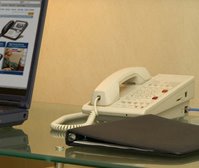 The fun started after we got an access code from reception, which we presumed you would enter into a default login page that would open as soon as you opened your browser. My laptop could see the Baros Wireless network as soon as I powered up but could not acquire an IP address. I tried a few things to remedy this but either their DHCP server was down or the access point in the room was flaky. I tried rebooting the access point, which is supplied by Teledex and is built into the room phone base, but this didn't resolve the problem.
In desperation I rang the island's IT supremo who said he'd be over in five minutes. Soon after I hung up I noticed that I had now acquired an IP address in the 10.x.x.x range and we were up and running. When the IT chappy arrived he said I should disable my proxy server (which I never have enabled) but couldn't explain why I was connected. I tried to explain to him that before I called him I wasn't able to even get an IP address and he said that I didn't need one! Hmmm... interesting network they're running. Anyway, he departed and the connection stayed up for a couple of hours, then went down. Once again, I could get no IP address from the DHCP server or couldn't communicate with it. I rang reception to complain and as soon as I did I noticed that I again got an IP address. After a little bit of experimentation I found that to make contact with the DHCP server one must first dial a number on the phone, any number will do (we've been dialling 9 for an outside line, which does the trick), and a few seconds later you get your IP address. I wouldn't like to think how other less techie guests are managing. I've been debating whether I'll share this info with the IT chappy, but I suspect he already knows that this quirk exists with at least some of the room wireless APs and is saying nothing.
So, at 25$ per day for a flaky, slow wireless link I say adieu. Talk to you again when we return to the world of broadband and leave you with a couple of pix from this morning's snorkelling.


Saturday, February 11, 2006
ICE Cool!

This blog comes from the deck of our beach bungalow where we are relaxing for a couple of weeks. It's two years since we were last here and there have been a number of impressive changes to the island in that time. Among them is the fact that wireless internet is now available so I can post a blog and get sunburn at the same time.
As always, we travelled out here with Emirates from Manchester via Dubai. The flight to Dubai was on one of the airlines new Boeing 777-300ERs (previously it was always a 777-200). The aircraft seating configuration (in steerage) has changed from 2-4-2 to 3-4-3, so we finished up with a window and centre seat instead of a window and aisle seat (I always try to get an aisle seat for my longish legs). This only became apparent after boarding so I wasn't looking forward to 6 1/2 hours stuck in a window seat. However, the 300ER variant has a greater seat pitch and width to the 200 version and it makes all the difference, so it was a much more comfortable experience than previously.
 But that's not what I wanted to tell you about. On that leg of the flight we experienced Emirates award winning ICE in-flight entertainment system. This is surely the gold standard by which all other airline in-flight entertainment systems will be judged for some time to come. Each seat is equipped wit a 10-inch touch sensitive screen + a remote controller that allows access to over 500 different channels of entertainment. Films on ICE (Information, Communication, Entertainment) include 45 of the latest, and I do mean latest, Hollywood releases and 28 all time classic movies. For younger flyers there are 25 Disney films including most of the classics. There are also nearly 25 films from Arabia, Asia and the Far East. With over 50 TV channels to choose from, including fourteen comedy channels alone, passengers are kept entertained throughout their journey. In the Sport TV section, Emirates has recently added channels dedicated to horseracing and sailing - to mark the airline's sponsorship of these sports. The audio section offers music from around the world - over 6,000 tracks of almost every genre imaginable. Categories also include recent CD releases, essential albums and audio books. You can, if you want, listen to every UK number in a particular year, from the 50s to the current year.
Now here's the neat bit. Unlike most other in-flight systems you can start any movie you want at anytime, you can pause it if you want to stretch your legs, and you can rewind or fast forward to any point. In other words you have total control over what you watch and when you watch it.
Other features I didn't personally try were e-mail, air to ground telephone, seat to seat telephone (if your partner or friend is sitting at a distance from you it's possible to chat), and a wide range of games you can play against the computer or against fellow passengers. All this in an economy seat - fabulous!
Thursday, February 02, 2006
Speaking of Viruses
Watch out for Kama Sutra this Friday February 3 and the third of every month henceforth. A new malicious worm called by various names like Nyxem, Mywife, Work–Grew A, Kama Sutra and Blackworm could begin infecting your computer system.The mass-mailing worm, which uses its own SMTP engine, sends copies of itself as e-mail attachments to addresses collected from the infected computers. The mails use social engineering techniques such as promise of pornographic pictures to entice users to open the attachment.It also propagates itself through network shares, including popular P2P file sharing services.
The virus gets under the radar of anti-virus software because of unique extensions: .b64, .bhx, .hqx, .uu, .uue, .mim. The worm has been in circulation since mid-January and many are unaware of its infection status. The virus targets popular file formats including .DOC, .XLS, .PPT, .PDF, and .ZIP. In addition to losing data, this virus also renders the keyboard and mouse inoperable, thereby leaving the user’s system dead.
Microsoft on Monday posted a security advisory on the worm, but has decided against updating its Windows Malicious Software Removal Tool before the next regularly-scheduled release of February 14.There is good news, though. Since this threat is relatively well-known to the security industry, major security vendors detect this worm and its variants. Whatever antivirus program you are using, (even if it is Norton!) make sure it's up to date and you should be protected.
The virus gets under the radar of anti-virus software because of unique extensions: .b64, .bhx, .hqx, .uu, .uue, .mim. The worm has been in circulation since mid-January and many are unaware of its infection status. The virus targets popular file formats including .DOC, .XLS, .PPT, .PDF, and .ZIP. In addition to losing data, this virus also renders the keyboard and mouse inoperable, thereby leaving the user’s system dead.
Microsoft on Monday posted a security advisory on the worm, but has decided against updating its Windows Malicious Software Removal Tool before the next regularly-scheduled release of February 14.There is good news, though. Since this threat is relatively well-known to the security industry, major security vendors detect this worm and its variants. Whatever antivirus program you are using, (even if it is Norton!) make sure it's up to date and you should be protected.
Wednesday, February 01, 2006
Antivirus programs
First off, let me say that any antivirus program, even one that is 6 months out of date, is better than none at all. However, it just doesn't make sense to let your antivirus program go out of date by more than a couple of weeks at most. The reason for this is the large number of new viruses that continue to be released and the rapidity with which they spread. All of PC Medic's PCs are connected to the internet on a daily basis and we ensure that the antivirus programs that we have installed never go out of date. The result? We have never had a viral infection on any of our machines. Now this is not just down to the antivirus programs we run - though they play an important part - it's also due to the fact that we are pretty cautious about how we interact with the Internet in general and e-mail in particular.
So what antivirus products are we running on our own PCs. On two of the machines we run Norton Internet Security (NIS) and on another two it's EZAntivirus. We used to run Norton on all our machines but we are phasing it out as licenses expire for a number of reasons. First up is that, in our opinion, it's sloppily written code. Time and again we get ccApp (a Norton executable) errors on shut down, with no documented solution on Symantec's website. We have problems with LiveUpdate not working and problems with corrupt installations spontaneously appearing. If you have ever tried to reinstall Norton you'll find that you have to remove every trace of previous installations before you can do so - a visit to Add/Remove programs in the Control Panel will not suffice. This is a program that leaves a trail of detritus all over your registry after you uninstall it, something a program that has been around as long as this should not do. We recently had a customer complain to us that all the icons in their control panel were gone after uninstalling Norton Antivirus and, sure enough, there was an errant registry entry that hadn't been cleaned up after the uninstall that caused the problem. Sometimes the program will just refuse to uninstall and it is then necessary to download another program from Symantec to handle failed unistallations!! Sloppy.
The second reason that NIS has fallen out of favour is that it's a resource hog. We have had to uninstall the program from three customers' machines in recent months because NIS slowed their machines down to unusable levels, even though they exceeded Symantec's minimum requirements. Once NIS was removed and replaced by a lighter weight AV product it was business as usual.
Finally, the price. NIS currently sells for €70.00 (download from Symantec) and, as such, does not represent good value for money, again in our opinion. While the package includes Norton AntiVirus, Norton Personal Firewall, Norton Privacy Control, Norton AntiSpam, & Norton Parental Control, most people buy it because they need an antivirus program and either do not need or know how to properly configure the other components in the package.
Norton Internet Security is a good package if you have a PC with at least 512MB of RAM, if you know how to configure all the components in the package and if you can put up with the sloppiness in the code mentioned above. It is top notch at detecting and repairing viral infections and their release schedule for new virus definitions is among the best in the industry. However, consider EZAntirus as an alternative. It's an effective antivirus solution, that uses minimal system resources and you can get a year's free trial here (or buy a 2-year subscription for just $19.95). It's not perfect either, but it updates itself on schedule, uninstalls cleanly and offers the level of protection against viruses that most home users need.
In summary, most home users do not need industrial strength antivirus/internet security suite products such as those offered by Norton and McAfee, though these are not intrinsically bad products. There are a number of good low-cost or, in some cases, free alternatives that will meet the home users needs just as well, such as EZAntivirus, AVG, F-Prot and Panda. The bottom line is to get an antivirus product that meets - not exceeds - your needs, keep it updated and, most importantly, make sure your behaviour in relation to how you interact with the Internet puts you in a low risk category of picking up a virus or other badware element.
So what antivirus products are we running on our own PCs. On two of the machines we run Norton Internet Security (NIS) and on another two it's EZAntivirus. We used to run Norton on all our machines but we are phasing it out as licenses expire for a number of reasons. First up is that, in our opinion, it's sloppily written code. Time and again we get ccApp (a Norton executable) errors on shut down, with no documented solution on Symantec's website. We have problems with LiveUpdate not working and problems with corrupt installations spontaneously appearing. If you have ever tried to reinstall Norton you'll find that you have to remove every trace of previous installations before you can do so - a visit to Add/Remove programs in the Control Panel will not suffice. This is a program that leaves a trail of detritus all over your registry after you uninstall it, something a program that has been around as long as this should not do. We recently had a customer complain to us that all the icons in their control panel were gone after uninstalling Norton Antivirus and, sure enough, there was an errant registry entry that hadn't been cleaned up after the uninstall that caused the problem. Sometimes the program will just refuse to uninstall and it is then necessary to download another program from Symantec to handle failed unistallations!! Sloppy.
The second reason that NIS has fallen out of favour is that it's a resource hog. We have had to uninstall the program from three customers' machines in recent months because NIS slowed their machines down to unusable levels, even though they exceeded Symantec's minimum requirements. Once NIS was removed and replaced by a lighter weight AV product it was business as usual.
Finally, the price. NIS currently sells for €70.00 (download from Symantec) and, as such, does not represent good value for money, again in our opinion. While the package includes Norton AntiVirus, Norton Personal Firewall, Norton Privacy Control, Norton AntiSpam, & Norton Parental Control, most people buy it because they need an antivirus program and either do not need or know how to properly configure the other components in the package.
Norton Internet Security is a good package if you have a PC with at least 512MB of RAM, if you know how to configure all the components in the package and if you can put up with the sloppiness in the code mentioned above. It is top notch at detecting and repairing viral infections and their release schedule for new virus definitions is among the best in the industry. However, consider EZAntirus as an alternative. It's an effective antivirus solution, that uses minimal system resources and you can get a year's free trial here (or buy a 2-year subscription for just $19.95). It's not perfect either, but it updates itself on schedule, uninstalls cleanly and offers the level of protection against viruses that most home users need.
In summary, most home users do not need industrial strength antivirus/internet security suite products such as those offered by Norton and McAfee, though these are not intrinsically bad products. There are a number of good low-cost or, in some cases, free alternatives that will meet the home users needs just as well, such as EZAntivirus, AVG, F-Prot and Panda. The bottom line is to get an antivirus product that meets - not exceeds - your needs, keep it updated and, most importantly, make sure your behaviour in relation to how you interact with the Internet puts you in a low risk category of picking up a virus or other badware element.
Subscribe to:
Posts (Atom)