Monday, August 21, 2006

Musical Interlude

Pink Floyd (minus Roger Waters) has recently released their Pulse double DVD. Directed by veteran music video and concert director David Mallet, and shot on video during Pink Floyd's two-week stint at London's Earls Court Exhibition Centre in October 1994, this 145-minute performance (from Floyd's Division Bell tour) is a sonic marvel to behold. Under a massive arch festooned with then-state-of-the-art laser, lighting, and projection systems, the 1987 incarnation of Pink Floyd (David Gilmour on lead guitar, keyboardist Richard Wright, and drummer Nick Mason) and their stellar supporting band kicks off with "Shine on You Crazy Diamond" (a loving tribute to Floyd co-founder Syd Barrett), followed by four tracks from The Division Bell, two from 1987's A Momentary Lapse of Reason, "Another Brick in the Wall (Part 2)" from 1979's magnum opus The Wall, and leading into intermission with an absolutely stunning performance of "One of These Days," the timeless opening track from 1971's Meddle.

The focus of Disc 2 is a near-perfect performance of 1974's Dark Side of the Moon in its entirety--reason enough to make this a must-have DVD for even the most casual Floyd admirers. And while no one will ever re-create the sheer magnificence of Clare Torry's original tour de force vocals on "The Great Gig in the Sky," it's safe to say that backup singers Sam Brown, Claudia Fontaine, and Durga McBroom deliver the next best thing, in addition to seamless contributions throughout the concert. After the closing heartbeat of "Eclipse," the concert ends with encore performances of "Wish You Were Here," "Comfortably Numb," and a no-holds-barred, pyrotechnically explosive rendition of The Wall's "Run Like Hell," all showcasing Gilmour's guitar mastery with frequent close-ups of his picking and fret-work as seen throughout the concert. (Like Gilmour, Mason and Wright were never dynamic onstage, and that's true here as well, but their technical precision is fully evident, and while guitarist Tim Renwick and saxophonist Dick Parry are each given moments to shine, bassist Guy Pratt (Wright's son-in-law) is a worthy substitution for Waters, especially when vocally sparring with Gilmour on "Run Like Hell.")

This is a DVD that requires a number of viewings/auditions to appreciate the quality of the performances contained within it. To some extent, the performance encapsulated within Pulse is a dying breed. Few super groups today put on the stadium extravaganza that was Pink Floyd ( U2 is one of the few that come to mind). If, like me, you were never fortunate enough to see the Floyd live, Pulse is the nearest you're going to get. Put it on your wish list, if only for Gilmour's god-like guitar playing.

Thursday, August 17, 2006

Expanding your Network

If you have a wireless network at home and your house is a standard contemporary 3-4 bed detached or semi-detached building then you should receive a good wireless signal throughout the house, and probably in the garden as well. However, if your house is of earlier construction with solid brick or stone walls, instead of stud partitions, or if your house extends over three floors, or is larger than average, then you may have some cold spots in your house where the Wi-Fi signal doesn't reach.

If so, there are a few things you can try to improve the range of your network. First off, consider the location of your wireless router. In many cases the router is located on the ground floor near to where the phone is. If you have a three story house (or your attic converted) and are having difficulty receiving a wireless signal on the top floor, then consider relocating the router to the first floor - equidistant between the ground floor and the top floor. Remember that the signal coming from your wireless router can be considered to be spherical, so try to locate all your house inside that sphere by locating the router in a central location within the house.

Try to locate your router away from solid brick or stone interior walls as these will absorb much of the signal and reduce the network's range. Also, move the router away from metal objects such as filing cabinets or PC cases. We recently had a customer who was getting a very poor signal in a bedroom across the hall from the study where the wireless router was. We found the router sitting on top of the PC system case - simply moving it to the desk above the PC provided a dramatic improvement to the reception in the bedroom.

Try a different type of wireless adapter. Not all wireless adapters are equal. We have found that the USB types are not always as good as PCI types with separate aerials. While it's difficult to give hard and fast recommendations on this, changing your adapter may help matters.

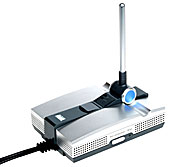
Install a range extender, such as the Linksys WRE54G shown in the picture. This is what Linksys says about it:

"Unlike adding a traditional access point to your network to expand wireless coverage, the Wireless-G Range Expander does not need to be connected to the network by a data cable. Just put it within range of your main access point or wireless router, and it "bounces" the signals out to remote wireless devices.

This "relay station" or "repeater" approach saves wiring costs and helps to build wireless infrastructure by driving signals into even those distant, reflective corners and hard-to-reach areas where wireless coverage is spotty and cabling is impractical. The Range Expander is perfect to help cover large areas in multi-story homes, warehouse environments, public spaces, and wireless "Hot Spots" -- anywhere you need extra coverage for your wireless network. "

PC Medic has been using one for the past couple of months and it does exactly what it says on the tin. A little messy to set up, but once set up it provides a nice boost to your wireless network.

Sunday, August 13, 2006

Happy Birthday

OFFICE workers across the globe yesterday celebrated, or perhaps cursed, the 25th anniversary of a device that changed the world: the mass- market personal computer, or PC. On August 30th, 1981 — the year Ronald Reagan entered the White House — IBM launched the 5150, a machine boasting a 4.77Mhz processor (about 650 times slower than today’s PCs), up to 256kb of memory (about 8,000 times less than today’s PCs) and an optional floppy drive with 160kb of capacity (barely enough for a Word document).

The PC was priced at $1,565, about £2,500 in today’s money, and made its debut to a sceptical public. And the 5150 was a huge success. It featured an enhanced version of Microsoft’s BASIC programing language, developed by a certain William Gates, and an 83-key adjustable keyboard. Unlike many other computers then, the keyboard and monitor were not built-in but attached — an industry standard that Apple has tried to counteract with its wireless Bluetooth iMacs.

The IBM PC was not the first personal computer: the Apple II came out in 1977 and the Atari 800 in 1979, but both used proprietary components and failed to develop sales into the mass market. In contrast, IBM used an Intel processor and Microsoft software, essentially allowing rival companies to clone its product. This move was a result of IBM simply being in a hurry, rather than any grand strategy.

But not everyone loves the PC — which, before the launch of the 5150, was known simply as the microprocessor. The 5150 began the era of Moore’s Law — or rapid obsolescence — along with repetitive strain injury, internet porn, timewasting viruses and countless other forms of PC frustration. Even making PCs has also become a commodity business. In 2004 IBM sold its PC business to the Chinese — a fitting end, some believed, to a world-changing product that had largely been an accident. As The New York Times noted back in 1981: “The speed and extent to which IBM has been successful has surprised many people, including IBM itself.” As the revolution rolls on, the one billionth computer was sold in 2002. The two billionth will be sold some time next year.

Wednesday, July 26, 2006

Dodgy Deals

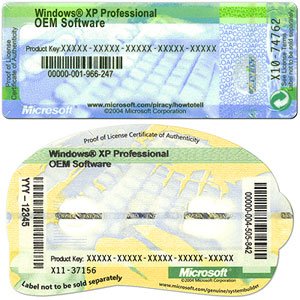
If you buy a PC from one of the large multiples, like PC World or Curry's, or direct from Dell, you can be sure that the operating system software on the PC is the genuine Microsoft product and your PC will have a Microsoft certificate of authenticity (COA) attached to it, similar to one of the ones shown in the pictures. If you buy a non-branded PC built by a local neighbourhood PC shop, then you need to check at time of purchase that you have both the software discs and the COA, or you could find yourself in trouble at a later date.

This was brought home today when a customer brought in a no-brand machine that was purchased in 2004 from a local neighbourhood PC shop. The first thing I found surprising was that the PC was running Windows 2000 Professional, an operating system aimed squarely at the business community and not the home user. As Windows XP, the first choice operating system for home users, had been around since 2001, it seemed strange that our customer's machine had been loaded with 2000 Professional. I'm sure it had nothing to do with the fact that 2000 Professional does not require product activation and can, therefore, be installed on multiple PCs - a tempting financial proposition for a less than scrupulous dealer! The absence of a Microsoft COA on the system box and the fact that the customer was not supplied with any OS installation discs was possibly just an oversight on the shop's part, or maybe not. As it happens, the customer also purchased Microsoft Office with the PC and again, no COA or product key was supplied nor any installation discs.

So what happens when such a customers PC requires a full reinstall due to either a hard disc failure or operating system corruption. Well, they need to buy a new operating system licence and a new copy of Microsoft Office as without the product keys supplied with the COAs for these products they cannot be reinstalled. And this could be quite an expensive proposition - several hundred euros when you include Microsoft Office.

So, if you are offered a PC for sale, make sure that there is Microsoft COA stuck on the system box, it is a requirement of Microsoft's licence agreement that this be done. Also, you should be supplied with original Microsoft discs for all Microsoft software that is supplied with your PC. If they refuse to supply you with COAs or discs, then take your custom elsewhere.

If you have already bought a PC and you did not get a COA or original discs, e.g. for Microsoft Office, then you should return to the vendor and point out that you are entitled by law to these and ask that they be supplied. If the vendor refuses to supply them to you then you should bring your complaint to Microsoft as the vendor is in breach of Microsoft's licence agreement. More information on the COA and what to do if you don't receive one can be found here on the Microsoft website.

Wednesday, July 12, 2006

Buying from Dell

We had a customer recently complain to us that they ordered a new PC from Dell and when they set it up they discovered that Microsoft Word wasn't installed. What the customer did not realize is that Dell do not supply Microsoft Word or, indeed, any components of Microsoft Office, as standard and if you require them you must pay extra for them. All PCs normally come with Microsoft Works, which includes a word processor but this word processor is not Microsoft Word.

If you need either Word or one of the other Microsoft Office components be sure to specify what you need at the time of purchase from Dell as to buy the software separately from the PC is much more expensive. For example, Microsoft Office Small Business Edition, which includes Word, Outlook, Powerpoint and Excel costs €314 when purchased with a new Dell PC but will cost you €550 (ouch!) if you wander over to PC World to buy it. If you only want Word, then you should order Works Suite, which is an extra €47 - buying Word from a retailer will cost you in the region of €299!

Wednesday, July 05, 2006

The Cost of Ink

Anyone using an inkjet printer these days can't help but notice how their price has fallen in recent times. As we speak, you can purchase an inkjet printer from PC World for €49.99 and a photo inkjet printer for €89.99. A few years ago these would have cost up to €200 or more so they appear pretty good value. That is until you start replacing the ink.

For example, one of the printers that we use here at PC Medic is an Epson R200 photo inkjet printer, which cost about €180 a couple of years ago. This printer has 6 separate ink cartridges (magenta, light magenta, cyan, light cyan, yellow and black) and produces superb colour prints on photo glossy paper. However, the recommended replacement ink cartridges cost in the region of €18.00 each when purchased locally. That's €108 for a complete set of cartridges, or 58% of the cost of the printer. Put another way, two sets of cartridges costs more than a new printer. We will use between 4 and 5 sets of cartridges per year i.e. we could spend up to €500 per year on ink - and we don't consider ourselves heavy users of the printer!

I say we could spend up to €500 per year, but we don't anymore. The reason for this is that we have switched from using branded Epson cartridges at €108 per set to generic cartridges supplied by Inkjet.ie at a cost of €35.00 per set, a massive saving of €73.00 per set. There are ongoing debates whether using generic ink cartridges leads to poorer quality prints, prints that fade quicker, or even to damage to your printer. At this point in time we can only confirm that we notice no significant difference in print quality when printing photo quality prints. Perhaps the pictures will fade in 20 years rather than in twenty five years, but I probably won't care that much by then. As for the generic cartridges damaging the printer, the savings to be gained are so great that I can afford to buy a new printer from the money saved after using just three sets of generic cartridges. As we have only switched to generic ink cartridges 6 months ago we can't give a long term assessment of the damage it might do to the printer, but we'll keep you posted in the future of any problems we encounter.

Note that the above experience relates only to the Epson R200 printer. Your own experience may be different depending on the make and model of printer that you use. For now, PC Medic is sticking with generic ink cartridges.

Monday, June 26, 2006

GPS - an Alternative to the Roadmap

In my earlier post I gave you details of two websites that can assist you in planning your route when undertaking a journey. A more high-tech solution is provided by GPS (Global Positioning System) satellite navigation (or SatNav, for short) devices, which have been falling in price dramatically over the past couple of years. These devices are designed to be mounted in your car and they provide a real-time map of your position, together with verbal instructions preparing you for junctions and turns in advance.

The majority of these devices come with software that you install on your PC and a set of maps covering certain global regions. Depending on the model you purchase you may receive either UK and Ireland maps with your device or maps for all of Europe (including UK and Ireland). You can generally purchase maps for other regions, such as the US and Australia.

PC Medic has been using a Navman GPS unit for about two years now and the experience has been very positive overall. The unit that we use is essentially a PDA, running Pocket PC Windows, with a built-in GPS receiver. The software that came with this unit is Navman SmartST and maps of all European countries are included. It has to be said that mapping support for Ireland, outside of the principal cities, is very poor. So, while you get excellent coverage of Dublin, and its environs, you cannot plot a route from, say, Ashbourne to Trim.

You will generally use the device to help you find the route between your current location and a destination. As the unit always knows your current location, from the satellites it uses for positioning, it is simply a matter of inputting your destination (town and street) in the appropriate data entry window and selecting Go. The unit will then calculate the most appropriate route (giving consideration for one-way streets, etc). The route is displayed as a moving map on the device's screen and the road you should be following is highlighted in red. As you come to turns and junctions that you must negotiate, these are displayed as light green arrows, clearly showing the direction you must follow.

At the bottom of the screen the current street or road name is displayed. At the bottom right of the screen the remaining distance that you must travel until the next action you must take is displayed. At the top of the screen the next action that you must take and the name of the road or street that you will turn onto is displayed. The top left corner of the map displays a graphical image of the next turn you will have to take (a left turn in the screenshot opposite).

In addition to the map and on-screen directions, you can choose to have all the directions clearly spoken to you by either a male or female voice. These directions take the form of "In 200 metres, at the roundabout, take the third exit". When you are actually on the roundabout, it will announce "Exit now" as you approach the third exit. This is a particularly useful feature and we have found that you can, in most cases, navigate complex routes by following the spoken directions and not looking at the display at all.

Perhaps one of the best features is that if you miss a turn, the system will recalculate a new route for you in 10-15 seconds to get you back on track - so it is practically impossible to get lost. We use the system almost daily for navigating the Dublin suburbs and have used it in France, Spain and the southwest US and it has not let us down yet.

However, there are some limitations. First off, the maps are out of date as soon as you buy the unit and they are not updated regularly. For example, the maps on our unit have the M50 ending at Ballinteer and all the new housing estates that have been built in the past two years are not included. This may or may not be a problem for you - it has rarely been an issue in our own experience.

As I mentioned earlier, Ireland is poorly mapped outside of the main population centres, so it is of limited use in Ireland outside of the main cities. Note, however, that rural areas in other European countries seem to be well mapped.

You should not follow the directions on the unit blindly as there may be traffic restrictions introduced since the mapping software was issued. For example, travelling from Stillorgan to Rathfarnham the unit will instruct me to take a right turn at the bottom of Upper Kilmacud Road onto Main St., Dundrum. There is, however, no right turn permitted at this junction!

Finally, as the GPS system requires line-of-sight to the satellites for it to get a fix, it doesn't work well in cities with high-rise buildings all around, such as Manhattan. Also, when you enter long tunnels, it may take the unit a minute or two to re-establish a satellite fix when you emerge from the tunnel.

Notwithstanding these limitations, a SatNav system certainly does contribute to stress-free travel when on unfamilar roads. I notice that there are more and more taxis in Dublin using SatNav these days and it can only be a few years from the day that SatNav will be included as standard on all new cars (it is available as an option on a number of prestige brands). In the meantime, you can fit a SatNav system for under €300 from one of the main manufacturers such as Navman, TomTom or Garmin, or visit a Halfords branch or Global Positioning Systems for a selection.

Wednesday, June 21, 2006

On the right Road?

It's that time of the year again when your thoughts turn to packing up the car and heading off on holiday for a week or so for a bit of a break and, hopefully, some sunshine. Before you head off, it's normally a good idea to get out the maps and plan your route in advance, particularly if you are heading to a country whose roads are not known to you. This is where route planning software can really help out. There are a number of commercial offerings out there to help you on your way, but I want to point you to a couple of free ones.

The first is provided courtesy of the AA's website and allows you to get detailed directions of a journey between any two points in Ireland, the UK or Europe. It also allows you to route via a particular waypoint that you want to visit and to avoid motorways and toll routes if you so choose. What it doesn't provide you with is a detailed map for your journey.

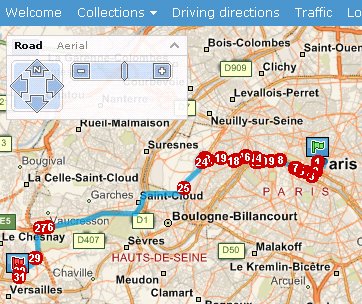
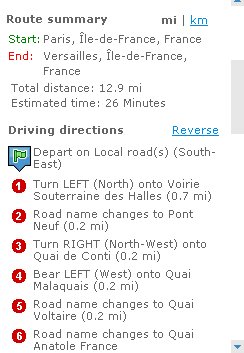
This is where Microsoft's Live Local website steals a march on the AA. As well as detailed instructions of the turns and twists that you need to take on the way, the Live Local site shows you zoomable maps with each turning point indicated and these maps can be printed out along with your route instructions. Live Local is not just limited to Europe, but provides more or less global coverage and, with a nod to Google Earth, allows you to overlay satellite images on your chosen route.

Between these two free websites you should be able to get your holiday off to a good start knowing you're on the right road.

Monday, June 19, 2006

DRM Blues

Nearly two years ago I signed up to the Eircom.net Music Club, which allows you to purchase music online - either complete albums or individual tracks. While their prices are not especially good if you buy individual tracks at €1.29 each, whole albums are better priced at €12.49, particularly if you buy a double album with up to 40 tracks on it.

So I happily bought quite a few albums over the months without paying too much attention to the small print of their licence agreement. Since then I have learned a bit about DRM, or Digital Rights Management, and why you should try to avoid it if at all possible. Basically DRM, in the context of purchased music downloads, is software that is intertwined with the music track you download. This software ensures that you can only play the music download, which you have paid for, within the terms of the licence issued with that download.

As it turns out, the music I purchased from Eircom.net's Music Club allows me to play the music on the PC that I originally downloaded it to. If I transfer that music to my laptop to bring with me when I travel, I have to download a new licence. Once I activate that licence the other licence becomes inactive. In total I can only re-activate the licence 3 times, thereafter the music will not play. If this wasn't enough of a restriction, the licence for this DRM-enabled (or should that be crippled?) music does not permit streaming of music via a streaming device, such as the Squeezeboxes we use at home. So, instead of getting a bargain I've got headaches and now go out of my way to avoid the purchase of any music with DRM attached to it, including all music on the Apple iTunes store. At least if you buy a CD you can (legitimately) rip the CD and use the ripped music in MP3 format on any machine you personally own, any MP3 player or any streaming device. I am fully against the illegal copying of music for distribution to others via P2P systems or other means. However, if I buy busic for my own personal use I do not want to be limited to how, where and when I can listen to that music. Avoid DRM and vote with your feet.

Saturday, June 17, 2006

End is nigh for Windows 98 and Me

If you are running Windows 98, Windows 98 Second Edition or Windows Me as the operating system on your PC you should be aware that all Microsoft support for these products, including updated security patches, ends on July 11th.

Without new security patches, these systems are exposed to new security threats, and will remain vulnerable to attacks. Possibly a good time to consider upgrading your PC, or at least the operating system.

Friday, June 16, 2006

Bring out your Dead!

You have an old computer and you want to get rid of it - what do you do? I've been offered a number of old PCs recently by their owners with the expectant question "What will you give me for it?". Unfortunately, what their owners fail to realize is that a PC that is more than 4-5 years old has practically zero resale value. This is partly due to how quickly PCs become obsolete as a result of the introduction of new technologies with higher specifications and also to the fall in the price of new PCs.

Why would anyone pay you for a 7-year old PC with a 400MHz single core processor, 64MB of RAM and a 20GB hard disc drive when they can buy a 2.8GHz Dual processor, 1024MB of RAM and a 160GB hard disc drive for just under €700 (including a 17" flat screen monitor!)?

If you have an old PC that you want to get rid of you could try one of your local schools and see if they will take it. Provided it is in full working order they may. More likely they will find it too old and difficult to maintain, particularly if it is running an older OS, like Windows 98.

Your other option is to bring it along to your local recycling unit, a list for Dublin can be found here. You'll be glad to hear that these centres do not have any charge for the disposal of computers or other waste electrical items.

Saturday, June 10, 2006

Keep Those Discs Safe

On a number of occasions over the past few months we have come across PCs that required a full reinstall of the operating system but the customer could not locate the discs that came with the PC. Depending on the brand of PC that you have, the absence of the manufacturers discs can be a problem. If your operating system becomes corrupt there are basically three ways that a manufacturer can allow you to restore it to normal.

The first is the way that Dell used to do it up until the last number of months. That is they supply you with a Windows XP installation disc and this can be used to reinstall the operating system. To do a full reinstall this way involves reformatting the hard disc drive, which wipes all your data and programs from the disc. So, once the operating system is reinstalled from the installation disc you then need to install device drivers for the hardware (chipset, graphics card, video card, modem, network adapter etc.). These drivers come on a second Dell CD usually labelled the Resource CD. If your PC is a Dell and it came with these discs then you should keep the discs in a safe place. However, if you cannot find them it isn't the end of the world. The operating system disc is generic so you can use the disc that came with another Dell PC, perhaps a friend has one. The Resource CD is not generic but is specific to your Dell model. However, even if you have lost this CD, you can download the drivers for your specific model from the Dell website by entering the service tag number for your PC on their Online Technical Support Page.

The second way that a manufacturer can allow you to recover your operating system is the way that current Dells, Packard Bells, IBMs and others do it. These PCs have a separate partition on the hard disc, which may be hidden, which contains an image of your system as it was supplied to you by the manufacturer. An image is like a digital snapshot of your system at a point in time and it will contain both the operating system, system drivers and any application software supplied by the manufacturer. To restore the PC to its as-new status a restore routine is invoked. This can be, depending on the manufacturer, by pressing a button such as F11 at startup or by using a System Restore disc that you boot the PC from. The advantage of this system of restoring your PC is that it restores not only the operating system, but also the drivers and supplied application software. The disadvantage is that if your hard disc becomes damaged, or you inadvertently deleted the recovery partition, you will have to go back to the manufacturer and see if they will supply a recovery DVD. If they will, they will charge you for it and it may take some time before you get it.

The third method of recovering your PC is using a recovery DVD. This is similar in principle to the second method, but the disk image is on one or more DVDs instead of a recovery partition on your hard disc. Compaq and Hewlett Packard PCs come with recovery DVDs and you do not want to lose these discs as they are specific to your machine and you cannot recover your machine without them. If you lose them, it is possible to get replacements but it may take you some time to get them and there will be a charge.

Thursday, June 08, 2006

PC For Sale - Sold


The PC described below has now been sold - thanks for all the interest in it.

It's not often that PC Medic has a PC for sale, but right now we have a real bargain on offer which would make the ideal upgrade unit. It's a rebuilt system box with a brand new PC Medic-installed Gigabyte motherboard and Intel 3.0 GHz processor. There is a 160Gb hard disk drive divided into two main partitions - one for the operating system and programs and one for data. Also included is a recovery partition that will restore your PC to "as-new" condition, should you run into problems down the line. The motherboard is fitted with 1Gb of DDR RAM and has integrated graphics and sound. There is a free AGP slot, if you want to fit a high-powered graphics card for game playing and three free PCI slots, so plenty of expansion options exist. The box has a single optical drive in the form of a DVD rewriter.

Windows XP Home Edition with Service Pack 2 is installed and all Microsoft Windows Updates have also been installed.

Pre-installed software includes the full OpenOffice productivity suite (see the blog below on OpenOffice for details), Anti-Virus software, Anti-Spyware software, iTunes, Adobe Reader, PowerDVD (to play DVD movies) and DeepBurner (for burning CDs/DVDs).

This high-spec PC is being offered as a system box only, so you will need to add a mouse, keyboard and monitor to have a complete system. Price is only €480.00. (if you need a monitor mouse or keyboard let us know and we'll give you a price for a full system). This unit is backed-up with the unparalleled support of PC Medic.

Contact me at brendan@pcmedic.ie if you are interested or want more details.

Note that we can add extras such as a wireless network card (it already has a built-in ethernet network card) or high-performance graphics card if required - contact me for a quote.

Friday, June 02, 2006

Windows OneCare Rivals

Hot on the heels of Microsoft launching their OneCare internet security solution (see New Internet Security Option post on May 31st) both Symantec and McAfee have announced rival solutions. Symantec's product is to be called Norton 360 while McAfee's product is currently using the codename Falcon. Norton 360 will be available before March 2007, possibly later this year while McAfee will be launching a beta version of Falcon in the coming weeks.

How these products will measure up to OneCare remains to be seen. What they all need to work on is simplifying the user experience. The current generation of internet security products still do not take into account that the average home user does not know how a firewall should be configured, what ports need to be open to use an attached webcam, or what IP address and subnet mask should be set to communicate with another PC on a home network and, I would argue, a home user should not need to know this. The ideal internet security product for home users should perform an analysis of the user's PC and then set the appropriate level of security based on the results of that analysis. Thereafter it should remain silent except to notify the user of important information. How many of us have experienced pop-up windows from internet security packages like Norton or McAfee that present cryptic message that are alsmost impossible for the average user to understand? Internet security software needs to get smarter and simpler at the same time. Let's hope that the products that will arrive in the next few months can achieve that.

Thursday, June 01, 2006

Microsoft Office Alternative

If you are in need of office productivity software (i.e a word processor, spreadsheet, presentation graphics or database) but don't currently have any installed on your PC then you have a few options that you can take. The current industry standard for office productivity software is Microsoft Office, which many of you will be familiar with from your working environment where you will have encountered Word, Excel or Powerpoint. Unfortunately, Microsoft Office doesn't come cheap - about €520 if you want to install the standard version of Microsoft Office 2003 on your PC. While most people would balk at the thought of paying so much money for software, it is in fact pretty good value for money, but it's still a lot of money.

An alternative that many people have yet to discover is the free, yes free, OpenOffice which can be downloaded from OpenOffice.org. This software is what is termed Open Source software and the following, taken from the OpenOffice.org website gives a bit of background to the software.


Historical background
StarDivision, the original author of the StarOffice suite of software, was founded in Germany in the mid-1980s. It was acquired by Sun Microsystems during the summer of 1999 and StarOffice 5.2 was released in June of 2000. Future versions of StarOffice software, beginning with 6.0, have been built using the OpenOffice.org source, APIs, file formats, and reference implementation. Sun continues to sponsor development on OpenOffice.org and is the primary contributor of code to OpenOffice.org. CollabNet hosts the website infrastructure for development of the product and helps manage the project.


Product Description
OpenOffice.org released the long-awaited version 2.0 of its free office suite for Windows, Mac and Linux on 20 October 2005 adding a new database module, support for the OpenDocument file format, a fresh user interface, and plenty of improvements and bug fixes.
OpenOffice.org 2.0 is the first open source office suite to offer thorough support for the Open Document Format for Office Applications (OpenDocument) OASIS Standard. OpenDocument is an XML file format that was developed by OASIS, the international body for the development and ratification of e-Business standards. The OpenDocument format can be used by any office application without fear of vendor specific lock-in or onerous licensing terms and fees, with the confidence that documents can be viewed, edited and printed for generations to come.

The suite now also offers a database module, Base, to complement the word processor (Writer), spreadsheet manager (Calc), presentation manager (Impress) and drawing tool (Draw) modules. These give all users the tools they need to be productive in the modern world. Free for all, OpenOffice.org offers everyone the enduring freedoms to use, study, improve and share the software. Users can download it for free from the Project's Web page.

With a new user interface, OpenOffice.org 2.0 is easy to learn and use by the most inexperienced user, and is significantly more compatible with Microsoft Office files than prior versions. Supported by dozens of professional companies, OpenOffice.org 2.0 will be available in more than 60 languages. Able to run on Microsoft Windows, GNU/Linux, Sun Solaris and other platforms, OpenOffice.org is increasingly the choice of businesses and governments throughout the world, and earlier versions have been downloaded over 49 million times since the project's inception.


So OpenOffice is a non-commercial version of the Sun Microsystem's commercially available StarOffice. The key difference between OpenOffice and StarOffice is that the former is supplied free of charge and with no support from Sun Microsystems. However, although not supported by Sun Microsystems, there is a vast range of support for OpenOffice through online user sites, forums, and blogs.

From the perspective of an average home user, OpenOffice can do everything that you would want to do, or could do with Microsoft Office. It even feels like Microsoft Office in terms of menus and commands that you might be used to. And, probably most importantly of all, it is compatible with Microsoft Office. So, if you are sent an Excel spreadsheet you can open it in the OpenOffice equivalent program which is Calc. If you create a document in the OpenOffice word processor, Writer, you can save the document as a .doc file that can be opened by Microsoft's Word.

The Windows download is 91MB, a few minutes if you have broadband, and versions are available for Linux and Mac users. Try it and let PC Medic know what you think.

 Use OpenOffice.org

Wednesday, May 31, 2006

New Internet Security Option

For those of you who have depended on Norton or McAfee to provide you with protection from viruses and other internet nasties you now have a new option. You probably will have heard of the company that has entered into competition with the market leaders in internet security - it's Microsoft.

Microsoft has just launched their Windows OneCare service which offers anti-virus, anti-spyware, two-way firewall, back-up and restore and system tune ups for $49.99 per year for up to 3 PCs. PC Medic signed up for their 90-day free trial earlier today and I can confirm that the sign-up, download and installation is a painless process that took about 15 minutes. Once installed the system will assign you a colour-coded status depending on what it finds on your PC.

A green icon means your status is Good. Protection Plus features like antivirus and firewall are up to date, your computer is not due for a tune-up or a backup, and there are no actions to take requiring your attention. Windows Live OneCare is running in the background, monitoring your system to prevent threats like viruses or spyware.

A yellow icon means your status is Fair. Usually this means you have an action to take, such as scheduling or running a tune-up or backup, or downloading a non-critical update. A yellow icon means there is no immediate threat to your system, but you should take care of the action as soon as you can to return your system to green.

A red icon means that your computer is At Risk. This can happen if, for example, Windows Live OneCare is unable to update Protection Plus with the latest virus definitions because of a lost Internet connection, or if the Windows Live OneCare Firewall is turned off.

The new firewall allows better control over outgoing traffic, as well as incoming traffic, and retains the simplicity and design of the firewall introduced in Windows XP Service Pack 2.

Full details from Microsoft's OneCare site.

Microsoft seems to have put a lot of effort into keeping the user interface as simple as possible, something other internet security vendors could learn from. Time will tell how effective the product is at keeping the nasties at bay. For now, its the only protection I have on my laptop and will report back in due course on my experiences with it. As the product has only just been released (though its been in public beta for some months) we can't recommend that you dump your Norton or McAfee products and install OneCare. However, PC Medic will report our experience with the product over the coming weeks and let you know what we think.

Tuesday, May 30, 2006

Router Reboot

One of the most common access problems you can have with broadband is when you open Internet Explorer and you get the dreaded Page Cannot be Displayed message. This can happen for a number of reasons, but the most common cause is that your router needs rebooting. The router is normally supplied by your broadband service provider - Netopia routers with Eircom and Zyxel routers with ESAT/BT - and these are, in effect, simple computers. Like all computers (unfortunately) they sometimes hang and if they do they will not allow internet access until they are rebooted.

Rebooting simply involves turning the power switch at the back of these units off for about 15 seconds. The power can then be turned back on again and the router will start its boot sequence, which can last for up to a minute. Once it has rebooted you may find that your internet access is magically restored.

In the case of wireless routers I have come across the situation where PCs connected to the router by ethernet cable can access the internet but wirelessly connected PCs cannot. Again, while there are a number of reasons why this might occur, a quick reboot of the router often resolves the issue in less than a minute.

One word of caution, you want to reboot your router, not reset it. At the back of your router you will find a recessed reset button that can only be pressed using a pen tip or paper-clip. You should never press this button unless instructed to do so by your internet service provider (or you know how to reconfigure a router manually!) as you will clear all the configuration settings needed to connect to your broadband service.

Sunday, May 28, 2006

Rogue Spyware Removal Programs

On more than one occasion a customer has told me how they got messages that their PC was infected by spyware and that they should download a named program, for $39.99, and all their problems would be resolved. However, after downloading said program their problems got even worse. What had happened here was that the customer's machine had become infected with spyware and they were duped into buying a rogue anti-spyware program - a program that did nothing for the money they paid for it.

Currently the number of rogue anti-spyware programs outnumber legitimate ones by a factor of nearly 10 to 1, so its important to know what's what. The Spyware Warrior website carries a comprehensive list of those programs that are known to be, or strongly suspected of being rogue software. If you are thinking of buying anti-spyware software (or if you bought a package and are concerned over its credentials) I suggest paying a visit to this site. PC Medic recommends Counterspy, from Sunbelt Software, as an effective first line defense against spyware.

Tuesday, May 23, 2006

Vista on the Horizon

Microsoft has recently announced that the next generation of their Windows operating system, called Vista, will not now be available to the home user market until January 2007. Despite the hype that will surround the launch of Vista, it will be an evolutionary rather than revolutionary product. The home user will notice the slick new Aero interface as the biggest change, followed by a new Windows Explorer and the provision of virtual folders. Much of the rest of the improvements relate to networking and security and may not be apparent to a casual home user, but are improvements that will hopefully make Vista a more secure operating system than its predecessors.

Microsoft has recently launched a GetReady site for Vista where you can find details on the minimum specification needed to run the new OS (for now, I suggest that you should take these minimum specs with a grain of salt as Microsoft has tended to understate these in the past - 128MB of RAM for XP Home? Yes it runs, but like a lame dog). What we can say from what they have published is that a lot of PCs out there will require a lot more RAM and more powerful graphics cards if Vista is to display the features of the new Aero interface. We'll save the debate about whether you should upgrade to Vista until after we have had the opportunity to try Vista for ourselves.

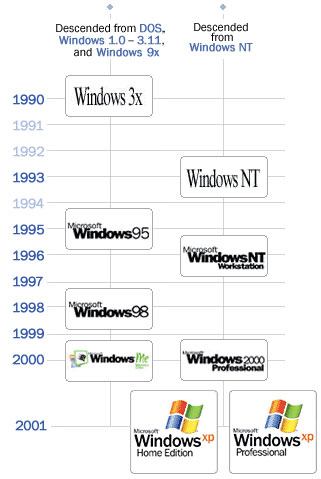
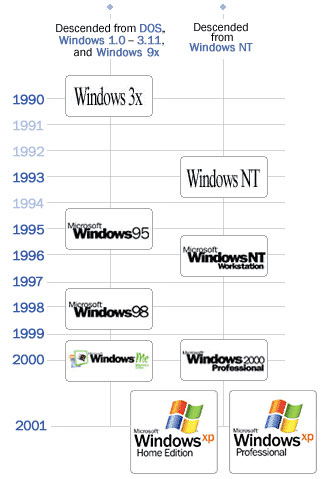
You may be interested to note that Windows XP, at the time of the launch of Vista, will be Microsoft's longest running Windows operating system, while Windows Me was the shortest surviving (no surprises there then).

Sunday, May 21, 2006

File Sharing Risks

If you're a regular to this blog you have, no doubt, heard me expound upon the risks of file-sharing. This is using programs like Limewire, Kazaa, BitTorrent, Bearshare, Morpheus and others to obtain free music or films via the internet. I came across this article recently and anyone who has a PC connected to the internet should take the time to read it as it provides a succinct summary of the risks of using such software.

Some other links that provide details of file sharing risks are here, here, here and here.